When WooCommerce says a plugin isn't compatible with the Checkout block, it means the plugin either declared itself incompatible or is a payment gateway with no block version. Shoppers won't see an error. The gateway or feature simply isn't on the checkout. You can fix it in three ways: update the plugin to a version that supports blocks, switch that page back to the classic checkout, or, if you maintain the plugin, add block support. The biggest catch is that plugins that add checkout fields the old way aren't listed at all, even though their fields disappear too.
I tested all three cases on WooCommerce 11.3 with small test plugins: a classic payment gateway, a classic checkout field, and a plugin that declares itself incompatible. Then I added block support to each and placed real orders. Here's what happened.
Where the warning appears
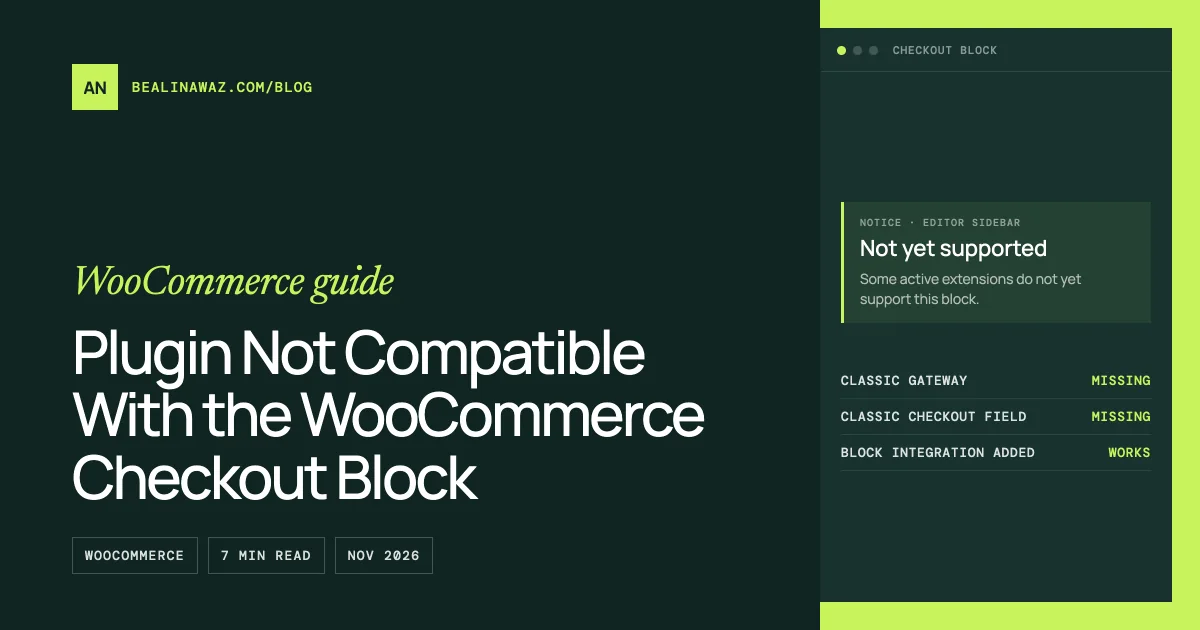
Open the Checkout page in the editor and select the Checkout block. The block's sidebar shows:
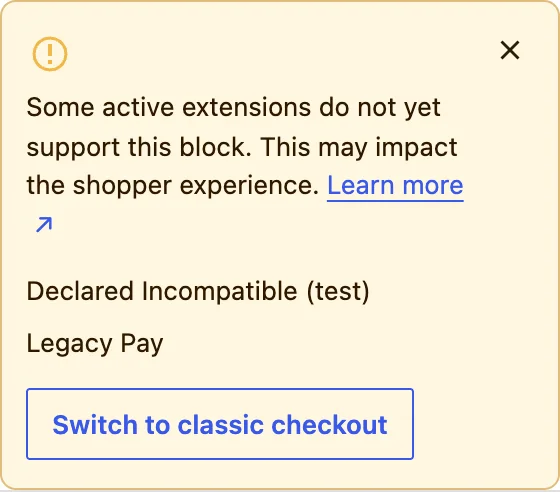
Administrators also see a notice on the checkout page itself, for example "Declared Incompatible (test) may not be compatible with the Checkout block. (Only administrators see this notice)". Customers never see either one.
What actually breaks (tested)
| Plugin type | Listed in the editor notice? | Admin notice on the checkout page? | What shoppers get on the Checkout block | On the classic checkout |
|---|---|---|---|---|
Declares itself incompatible (declare_compatibility( 'cart_checkout_blocks', …, false )) |
Yes | Yes | Depends on the plugin | Works |
| Payment gateway with no block integration | Yes | No | The payment method is missing. No error, it's just not offered | Shown and works |
Adds a field with the old woocommerce_checkout_fields filter |
No | No | The field is missing | Shown |
Two findings from the test surprised me:
- The gateway is fine on the server. WooCommerce's Store API still listed "Legacy Pay" as available and accepted an order placed with it. Only the Checkout block's interface didn't know how to show it. That's why the fix is mostly JavaScript (below).
- Missing fields go unreported. A plugin that adds a VAT number, delivery date or gift message with the classic filter isn't flagged anywhere. The field just isn't there on the block checkout. If your store relies on a checkout field, check it yourself.
The notice also doesn't list every plugin you have. WooCommerce treats plugins that never declared anything as compatible, so the list only shows plugins that declared themselves incompatible, plus payment gateways with no block integration.
Your options as a store owner
- Update the plugin. Many gateways and checkout plugins have added block support since the Checkout block became the default for new stores in WooCommerce 8.3. Then check the editor notice again.
- Check the plugin's documentation for "Cart and Checkout blocks" or "block checkout". Some plugins need a setting turned on, or a separate add-on.
- Switch to the classic checkout. The "Switch to classic checkout" button in the notice replaces the Checkout block with the classic checkout on that page. Everything classic works again. You lose the block checkout's features, such as the newer field options and the block layout. It's the quickest fix when a payment method you need is missing.
- Replace the plugin with one that supports blocks, if it's abandoned.
Whichever you choose, run this check:
- Every payment method you offer appears on the checkout.
- Every custom field (VAT number, delivery date, gift message) appears and is saved to the order.
- A test order with each payment method goes through.
For developers: add Checkout block support
Payment gateways: register a block integration
A classic gateway needs two extra pieces: a PHP class that tells the blocks about it, and a script that registers it in the browser. This is the minimal version I tested. "Legacy Pay" appeared on the Checkout block, and a guest order went through with it.
In the main plugin file:
add_action(
	'woocommerce_blocks_payment_method_type_registration',
	function ( Automattic\WooCommerce\Blocks\Payments\PaymentMethodRegistry $registry ) {
		require_once __DIR__ . '/class-legacy-pay-blocks.php';
		$registry->register( new Legacy_Pay_Blocks() );
	}
);
class-legacy-pay-blocks.php:
<?php
use Automattic\WooCommerce\Blocks\Payments\Integrations\AbstractPaymentMethodType;

/**
 * Tells the Cart and Checkout blocks about the Legacy Pay gateway.
 */
final class Legacy_Pay_Blocks extends AbstractPaymentMethodType {
	/** Must match the gateway ID. */
	protected $name = 'legacy_pay';

	public function initialize() {
		$this->settings = get_option( 'woocommerce_legacy_pay_settings', array() );
	}

	public function is_active() {
		$gateways = WC()->payment_gateways()->payment_gateways();
		return isset( $gateways[ $this->name ] ) && $gateways[ $this->name ]->is_available();
	}

	public function get_payment_method_script_handles() {
		wp_register_script(
			'legacy-pay-blocks',
			plugins_url( 'legacy-pay-blocks.js', __FILE__ ),
			array( 'wc-blocks-registry', 'wc-settings', 'wp-element', 'wp-html-entities' ),
			'1.0.0',
			true
		);
		return array( 'legacy-pay-blocks' );
	}

	public function get_payment_method_data() {
		return array(
			'title'       => $this->get_setting( 'title', 'Legacy Pay' ),
			'description' => $this->get_setting( 'description', 'Pay by bank transfer after you order.' ),
		);
	}
}
legacy-pay-blocks.js (plain JavaScript, no build step needed):
( function () {
	const { registerPaymentMethod } = window.wc.wcBlocksRegistry;
	const { getSetting } = window.wc.wcSettings;
	const { createElement } = window.wp.element;
	const { decodeEntities } = window.wp.htmlEntities;

	// Data from Legacy_Pay_Blocks::get_payment_method_data(), keyed "<name>_data".
	const settings = getSetting( 'legacy_pay_data', {} );
	const title = decodeEntities( settings.title || 'Legacy Pay' );
	const Content = () => decodeEntities( settings.description || '' );

	registerPaymentMethod( {
		name: 'legacy_pay',
		label: createElement( 'span', null, title ),
		ariaLabel: title,
		content: createElement( Content ),
		edit: createElement( Content ),
		canMakePayment: () => true,
		supports: { features: [ 'products' ] },
	} );
} )();
Things to get right:
$nameandnamemust match the gateway ID ($this->idin yourWC_Payment_Gatewayclass). The settings arrive in JavaScript as<name>_data.- List
wc-settingsas a dependency. The script readswindow.wc.wcSettings. - The order still goes through
process_payment(). For gateways with card fields or redirects, the JavaScript side also needs to pass payment data withonPaymentSetup. See WooCommerce's payment method integration guide.
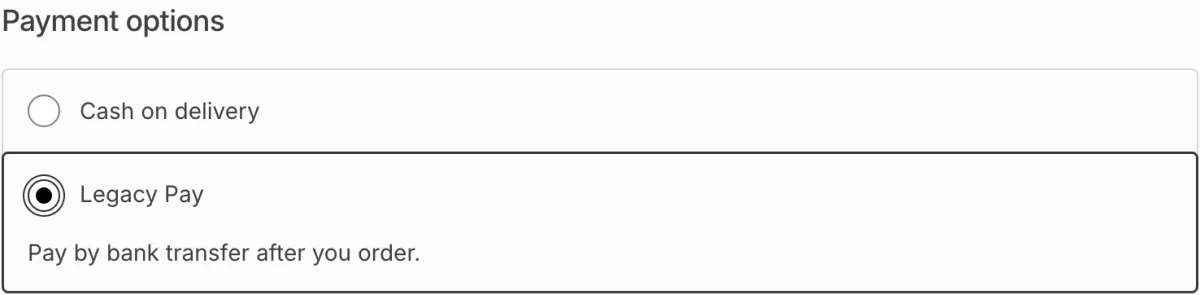
After the integration, the editor notice no longer listed Legacy Pay.
Checkout fields: use the Additional Checkout Fields API
Fields added with woocommerce_checkout_fields only exist on the classic checkout. On the Checkout block, register them with woocommerce_register_additional_checkout_field(). In my test, this made the VAT number field appear on the block checkout:
add_action(
	'woocommerce_init',
	function () {
		if ( ! function_exists( 'woocommerce_register_additional_checkout_field' ) ) {
			return;
		}
		woocommerce_register_additional_checkout_field(
			array(
				'id'       => 'my-store/vat-number',
				'label'    => 'VAT number',
				'location' => 'address',
				'required' => false,
			)
		);
	}
);
The full walkthrough, with saving and showing the value on orders and emails, is in How to add a custom field to the WooCommerce block checkout.
Declare compatibility once it's true
When your plugin works with the blocks, say so in your main plugin file:
add_action(
	'before_woocommerce_init',
	function () {
		if ( class_exists( \Automattic\WooCommerce\Utilities\FeaturesUtil::class ) ) {
			\Automattic\WooCommerce\Utilities\FeaturesUtil::declare_compatibility( 'cart_checkout_blocks', __FILE__, true );
		}
	}
);
Declare true only after you've tested the block checkout. A plugin that declares false is listed in the notice for every store that uses it.
FAQ
What does "Some active extensions do not yet support this block" mean?
It means at least one active plugin either declared itself incompatible with the Cart and Checkout blocks or is a payment gateway with no block integration. The plugins are listed under the message in the Checkout block's settings.
Why is my payment method not showing on the WooCommerce checkout?
If your checkout page uses the Checkout block, a gateway without block support isn't offered there, even though it's enabled. Update the gateway plugin, check its docs for block support, or switch the page to the classic checkout.
Is it safe to click "Switch to classic checkout"?
Yes. It replaces the Checkout block on that page with the classic checkout, which works with older plugins. You can switch back by adding the Checkout block again. Test an order afterwards either way.
Why aren't my custom checkout fields showing on the block checkout?
They were probably added with the woocommerce_checkout_fields filter, which only the classic checkout reads. Register them with the Additional Checkout Fields API instead, or switch that page to the classic checkout.
Does WooCommerce list every incompatible plugin?
No. It lists plugins that declared themselves incompatible and payment gateways without block support. Plugins that changed the classic checkout with filters or templates aren't listed, so test the checkout yourself.
When to get help
If a gateway or checkout plugin you depend on has no block support, I can add it, or move your fields to the Additional Checkout Fields API, and test the full checkout on a staging copy. See WooCommerce development. Related: hide a payment method for specific products, which works on both checkouts.