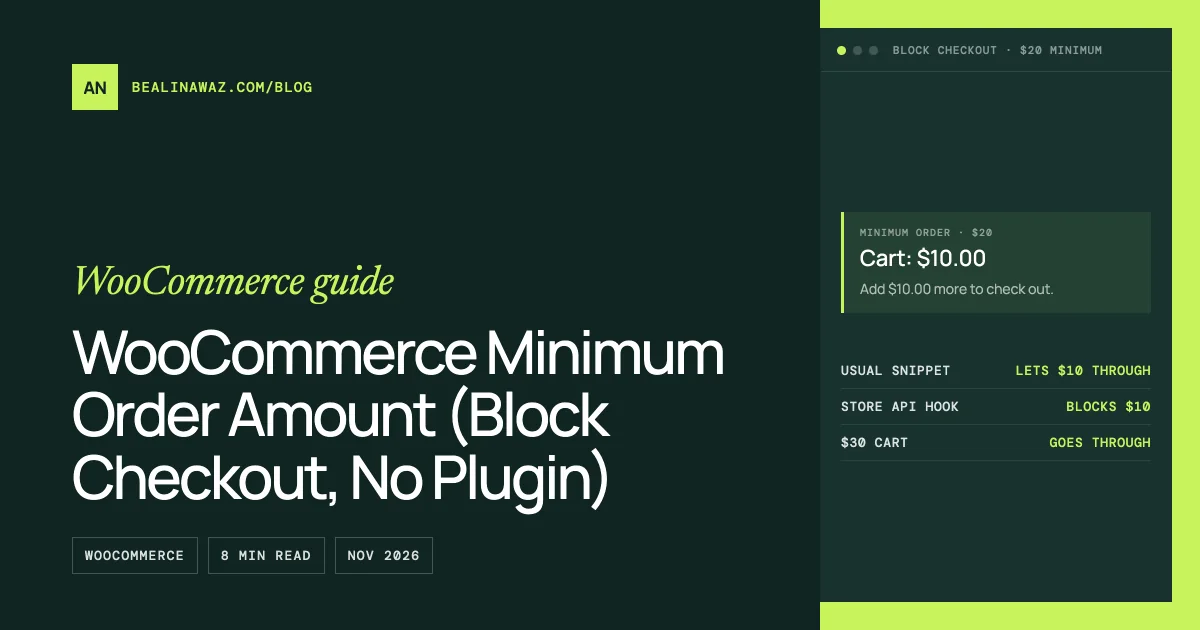
To set a minimum order amount in WooCommerce without a plugin, add an error in the woocommerce_store_api_cart_errors action when the cart total is below your minimum, and do the same in woocommerce_check_cart_items for the classic checkout. The first hook is what the Cart and Checkout blocks use. The snippet most guides show hooks into woocommerce_checkout_process instead, and on the block checkout that hook never runs, so orders below your minimum go straight through.
I tested both versions on WooCommerce 11.3 and placed real orders with each. The results, the complete code, and a version with a higher minimum for international orders are below.
Why the usual snippet doesn't work on the block checkout
Search for "woocommerce minimum order amount" and almost every snippet, including Google's own AI answer, looks like this:
add_action( 'woocommerce_checkout_process', 'wc_minimum_order_amount' );
add_action( 'woocommerce_before_cart', 'wc_minimum_order_amount' );
Both hooks belong to the classic, shortcode-based cart and checkout. woocommerce_checkout_process fires inside WC_Checkout::process_checkout(), which only the classic checkout calls. Since WooCommerce 8.3, new stores get the Cart and Checkout blocks by default. Those blocks place the order through the Store API (/wc/store/v1/checkout), which never calls process_checkout().
I set a $20 minimum and placed orders on a test store with a $10 product and cash on delivery:
| Minimum order code | $10 cart, block checkout | $10 cart, classic checkout | $30 cart |
|---|---|---|---|
| None | Order placed | Order placed | Order placed |
The usual woocommerce_checkout_process snippet |
Order placed anyway | Blocked | Order placed |
| The code in this guide | Blocked, with the message | Blocked | Order placed |
So if your store uses the block checkout, the classic snippet gives you a notice on the cart page (sometimes) and no protection where it counts.
To check which checkout you have, open the Checkout page in the editor. If you see a "Checkout" block, it's the block checkout. If the page only contains [woocommerce_checkout], it's the classic one.
The code: a minimum order amount for the block and classic checkout
Add this to a small custom plugin or a code snippets plugin (more on that below). Change 20 to your minimum.
<?php
/**
 * Minimum order amount for WooCommerce: block and classic cart and checkout.
 */

/** The minimum, in the store currency, compared with the items total after coupons (before shipping and tax). */
function mystore_minimum_order_amount() {
	return 20;
}

/** The items total after coupons, before shipping and tax. */
function mystore_order_amount( WC_Cart $cart ) {
	return (float) $cart->get_cart_contents_total();
}

function mystore_minimum_order_message( $amount ) {
	$plain = static fn( $value ) => html_entity_decode( wp_strip_all_tags( wc_price( $value ) ) );
	return sprintf(
		/* translators: 1: minimum order amount, 2: current amount, 3: amount still needed */
		__( 'The minimum order is %1$s. Your cart comes to %2$s, so add %3$s more to check out.', 'mystore' ),
		$plain( mystore_minimum_order_amount() ),
		$plain( $amount ),
		$plain( mystore_minimum_order_amount() - $amount )
	);
}

// Block cart and checkout (they use the Store API).
add_action(
	'woocommerce_store_api_cart_errors',
	function ( WP_Error $errors, WC_Cart $cart ) {
		$amount = mystore_order_amount( $cart );
		if ( $amount < mystore_minimum_order_amount() ) {
			$errors->add( 'mystore_minimum_order', mystore_minimum_order_message( $amount ) );
		}
	},
	10,
	2
);

// Classic cart and checkout (shortcodes).
add_action(
	'woocommerce_check_cart_items',
	function () {
		$amount = mystore_order_amount( WC()->cart );
		if ( $amount < mystore_minimum_order_amount() ) {
			wc_add_notice( mystore_minimum_order_message( $amount ), 'error' );
		}
	}
);
Here's what each part does:
woocommerce_store_api_cart_errorsruns every time the Store API validates the cart, both when the Cart block loads and when the Checkout block places the order. An error added here appears as a red notice in the cart and checkout, and the order is refused with HTTP 409. WooCommerce added this action in 7.2 (CartController.php).woocommerce_check_cart_itemsruns on the classic cart page, on the classic checkout page and again while the classic checkout processes the order. With an error, the classic checkout hides its form and says "There are some issues with the items in your cart", and the cart page shows your message.- The message is plain text.
wc_price()returns HTML, and the block notices show text, so the code strips the tags and decodes$back to$. Without that, customers can see raw entities in the notice. - The amount is the items total after coupons, before shipping and tax. See the next section if you want a different total.
This is what a customer sees on the block checkout with $10 in the cart:
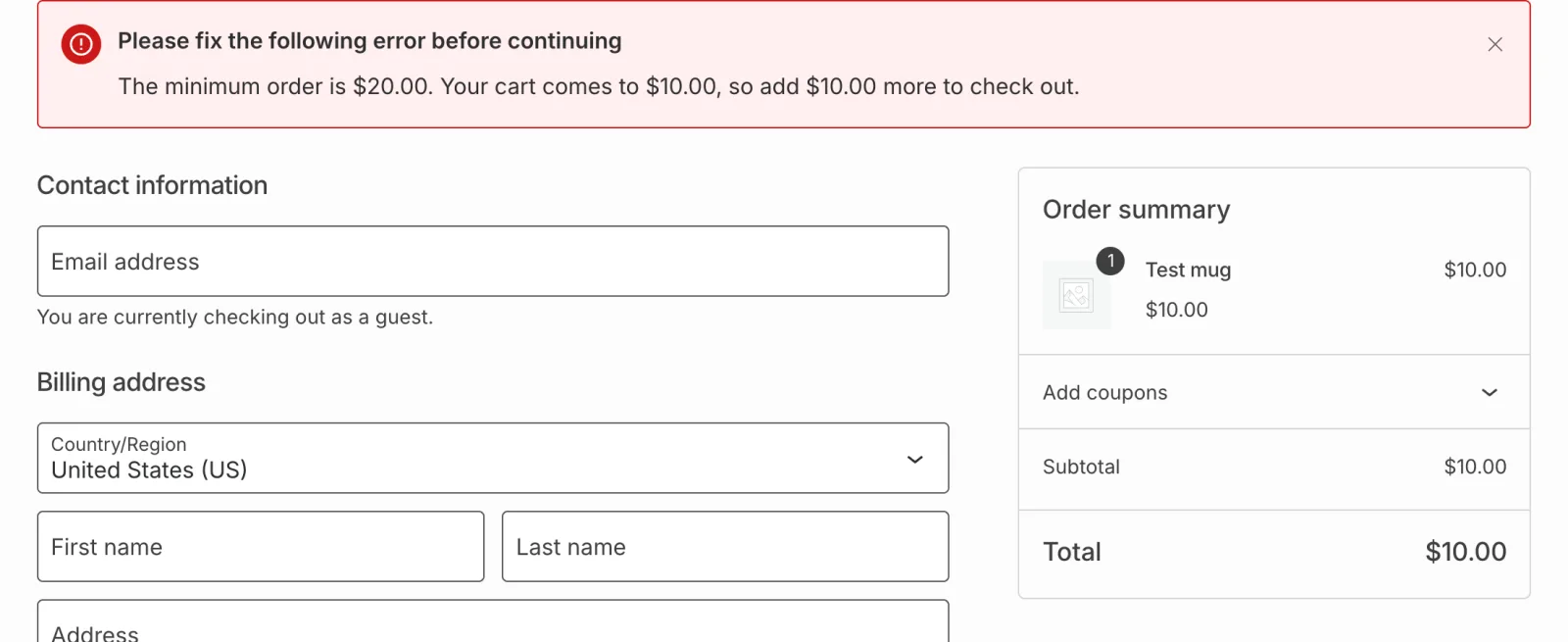
The Place Order button still shows, but the order is refused until the cart reaches the minimum, and the notice says exactly how much to add.
Which total should the minimum use?
Decide this before you go live, because customers notice when a $20 minimum rejects a $22 cart with a $5 coupon. These are the WC_Cart methods you can use in mystore_order_amount():
| Method | What it includes | Use it when |
|---|---|---|
get_cart_contents_total() |
Items after coupons, no shipping or tax (the default above) | You care about the value of the goods |
get_subtotal() |
Items before coupons, no shipping or tax | Coupons shouldn't push a cart below the minimum |
get_total( 'edit' ) |
Everything: items, fees, shipping and tax | You need a minimum on the amount actually charged |
Prices entered with tax included? get_cart_contents_total() still excludes the tax part, so compare against the pre-tax amount or add get_cart_contents_tax() to it.
A higher minimum for international orders
Some rules depend on the address, which the cart doesn't know yet. For those, WooCommerce 9.9 added woocommerce_checkout_validate_order_before_payment. It runs on the block checkout after the order is built from the form and before payment is taken (OrderController.php). This version asks for $50 when the order ships outside the United States:
// A higher minimum for orders shipped outside the United States, checked once the address is known.
add_action(
	'woocommerce_checkout_validate_order_before_payment',
	function ( WC_Order $order, WP_Error $errors ) {
		$minimum = 50; // International minimum, in the store currency.
		$country = $order->get_shipping_country() ?: $order->get_billing_country();
		$amount  = (float) $order->get_subtotal() - (float) $order->get_discount_total();
		if ( 'US' !== $country && $amount < $minimum ) {
			$errors->add(
				'mystore_international_minimum',
				sprintf(
					/* translators: %s: minimum order amount */
					__( 'Orders shipped outside the United States need a minimum of %s before shipping.', 'mystore' ),
					html_entity_decode( wp_strip_all_tags( wc_price( $minimum ) ) )
				)
			);
		}
	},
	10,
	2
);
In my test, a $30 order to Canada was refused with that message, and the same $30 order to a US address went through. This hook only runs on the block checkout. For a classic checkout, use woocommerce_after_checkout_validation, which receives the posted form data and the errors object.
Where to put the code
Don't paste it into your theme's functions.php. A theme update or switch would remove your minimum without telling you, and the store would simply start taking small orders again. Use one of these:
- A code snippets plugin such as WPCode or Code Snippets. Let the snippet run everywhere, not only in the admin, because the block checkout talks to the server through the REST API.
- A small custom plugin. Create
wp-content/plugins/mystore-minimum-order/mystore-minimum-order.php, put a plugin header at the top (<?php /* Plugin Name: My Store Minimum Order */), paste the code below it and activate it.
Then test it: add a product below the minimum, open the cart and the checkout, and try to place the order. After that, add enough to pass the minimum and place a real test order.
Plugin or code?
If you need more than one rule, a plugin is the faster route:
- WooCommerce's own extensions: Minimum Order Amount and Minimum and Maximum Order Amount handle rules per product, category, user role and shipping method. They're paid extensions.
- Free on WordPress.org: for example "Order Minimum/Maximum Amount Limits for WooCommerce", which also limits by quantity and weight.
Whichever you choose, run the same test as above on your block checkout before trusting it.
The code in this guide makes sense when you have one or two fixed rules, you'd rather not add another plugin, or a plugin you tried only blocks the classic checkout.
Common mistakes
- Testing only the cart page. The classic snippet shows a notice on the cart, which looks like it works. The order has to be refused at checkout, so always try to place one.
- Comparing
WC()->cart->total. That property is the grand total including shipping, so a customer can reach your "goods" minimum by choosing express shipping. - Raw HTML in block notices. If the notice shows
$20.00, the message still containswc_price()HTML. Strip it as the code above does. - Forgetting free shipping thresholds. "Free shipping over $50" (a shipping method setting) is different from a minimum order. If you use both, make the messages agree.
- Caching the cart or checkout. Page caching on cart or checkout pages breaks notices and totals. Caching plugins normally exclude the WooCommerce cart and checkout pages; check that yours still does.
FAQ
Does WooCommerce have a built-in minimum order amount?
No. WooCommerce has no setting for a minimum order value. Coupons have a "Minimum spend" field, but it only applies to that coupon. A storewide minimum needs code like the snippet above or an extension.
Why does my minimum order snippet stop working on the block checkout?
Because it hooks into woocommerce_checkout_process or woocommerce_before_cart, which only the classic shortcode checkout runs. The Cart and Checkout blocks use the Store API, so the rule has to be added in woocommerce_store_api_cart_errors.
Can I set a minimum order amount per product or category?
Yes. In mystore_order_amount(), loop over $cart->get_cart() and add up only the line totals ($item['line_total']) of products in that category, checked with has_term( 'category-slug', 'product_cat', $item['product_id'] ). Then compare that sum with the category's minimum.
Can wholesale customers have a different minimum?
Yes. In mystore_minimum_order_amount(), return a different number when the current user has your wholesale role, for example by checking in_array( 'wholesale_customer', wp_get_current_user()->roles, true ).
Does the minimum include shipping and tax?
In this guide's code, no: it uses the items total after coupons. Swap in get_total( 'edit' ) if your minimum should include shipping and tax.
When to get help
If your store has several minimums, mixed classic and block pages, or a payment plugin that behaves differently, I can set it up and test it on a staging copy. See WooCommerce development. For related checkout changes, see adding a custom field to the block checkout and hiding a payment method for specific products.