To add a cash on delivery fee in WooCommerce without a plugin, add the fee in the woocommerce_cart_calculate_fees action when the chosen payment method is cod. The same pattern works for any gateway, and for a percentage instead of a fixed amount. The part most snippets get wrong is the pre-selected payment method. Before the shopper clicks anything, WooCommerce hasn't stored their choice yet, so the usual snippet adds no fee. In my test, an order placed with cash on delivery pre-selected went through without the fee.
Below is code that handles that case, a percentage version, and the small script the classic checkout needs. I tested each on WooCommerce 11.3 with real orders.
The problem with the usual snippet
Most guides read the chosen method straight from the session:
$chosen = WC()->session->get( 'chosen_payment_method' );
if ( 'cod' === $chosen ) {
	$cart->add_fee( 'Cash on delivery fee', 5 );
}
This is what happened on the Checkout block with cash on delivery as the first (pre-selected) payment method:
| What the shopper did | Fee shown | Order placed |
|---|---|---|
| Nothing; cash on delivery was pre-selected | None | $30.00 with no fee |
| Clicked another method, then back to cash on delivery | $5.00 | $35.00 with the fee |
The session value only exists after the shopper selects a method. A shopper who accepts the default never selects one, so the fee never applies. Most shoppers don't change the default, so this is the common case.
The code: a cash on delivery fee that always applies
Add this to a small custom plugin or a code snippets plugin. Change 5 to your fee.
<?php
/**
 * The payment method the shopper has chosen, or the one the checkout preselects
 * (the first available gateway) before they've clicked anything.
 */
function mystore_chosen_payment_method() {
	$chosen = WC()->session ? (string) WC()->session->get( 'chosen_payment_method' ) : '';
	if ( '' !== $chosen ) {
		return $chosen;
	}
	$available = WC()->payment_gateways()->get_available_payment_gateways();
	return (string) array_key_first( $available );
}

// A fixed fee for cash on delivery.
add_action(
	'woocommerce_cart_calculate_fees',
	function ( WC_Cart $cart ) {
		if ( is_admin() && ! wp_doing_ajax() ) {
			return;
		}
		if ( 'cod' === mystore_chosen_payment_method() ) {
			$cart->add_fee( __( 'Cash on delivery fee', 'mystore' ), 5, true );
		}
	}
);
How it works:
mystore_chosen_payment_method()uses the shopper's choice when there is one. Otherwise it falls back to the first available gateway, which is the one WooCommerce pre-selects. WooCommerce's own Store API picks the default the same way when nothing is stored. One exception: logged-in customers with a saved card get that card's gateway pre-selected, so if you charge a fee on a gateway that supports saved cards, test as a logged-in customer too.woocommerce_cart_calculate_feesruns every time WooCommerce recalculates the cart, including on the Checkout block and when the order is placed.- The third argument of
add_fee()(true) makes the fee taxable. Passfalseif your fee shouldn't be taxed.
Results with this code:
| What the shopper did | Fee shown | Order placed |
|---|---|---|
| Nothing; cash on delivery pre-selected | $5.00 | $35.00 with the fee |
| Switched to another method | Fee removed | $30.00, no fee |
| Switched back to cash on delivery | $5.00 | $35.00 with the fee |
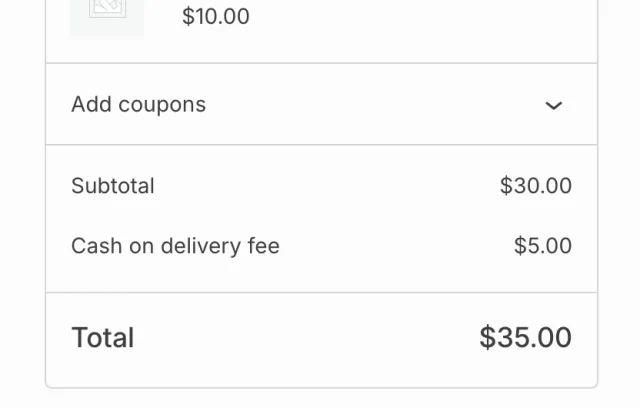
On the Checkout block, the total updates as soon as the shopper switches payment methods. In WooCommerce 11.3, the block sends the new choice to the server and recalculates the totals. No extra code is needed.
A percentage fee for one payment method
To charge a surcharge on a gateway instead, for example 3% for a card processor, calculate the fee from the cart:
// A percentage surcharge for one gateway: 3% of the items total after coupons.
add_action(
	'woocommerce_cart_calculate_fees',
	function ( WC_Cart $cart ) {
		if ( is_admin() && ! wp_doing_ajax() ) {
			return;
		}
		if ( 'stripe' === mystore_chosen_payment_method() ) {
			$surcharge = round( $cart->get_cart_contents_total() * 0.03, wc_get_price_decimals() );
			$cart->add_fee( __( 'Payment processing fee (3%)', 'mystore' ), $surcharge, true );
		}
	}
);
Replace stripe with your gateway's ID. You'll find it in the address of the gateway's settings page (…§ion=stripe) or by checking the value of the payment option's radio button. In my test, a $30 cart showed "Payment processing fee (3%) $0.90" and a total of $30.90.
Check your payment provider's rules before adding a surcharge. Card networks and some countries and US states limit or forbid card surcharges. A fee for cash on delivery, which covers the courier's handling, is a different matter, but check local rules too.
The classic checkout needs one more line
On the classic, shortcode-based checkout, changing the payment method doesn't recalculate the totals. In my test, the cash on delivery fee stayed on screen after switching to another method. The order itself was charged correctly, because WooCommerce recalculates when it's placed, but the shopper saw the wrong total. This small script asks the checkout to refresh when the payment method changes:
// Classic checkout only: recalculate totals when the shopper picks another payment method.
add_action(
	'wp_footer',
	function () {
		if ( ! is_checkout() || is_order_received_page() || has_block( 'woocommerce/checkout' ) ) {
			return;
		}
		?>
		<script>
		jQuery( function ( $ ) {
			$( 'form.checkout' ).on( 'change', 'input[name="payment_method"]', function () {
				$( document.body ).trigger( 'update_checkout' );
			} );
		} );
		</script>
		<?php
	}
);
With it, switching methods on the classic checkout swapped the cash on delivery fee for the 3% fee and back. The has_block() check keeps the script off block checkout pages, which don't need it.
Where to put the code
Use a code snippets plugin (WPCode, Code Snippets) and let the snippet run everywhere, or create a small plugin in wp-content/plugins/. Don't use your theme's functions.php: a theme switch or update would silently remove the fee.
Then test it: open the checkout without clicking a payment method and check the fee shows. Place a test order. Switch methods and check the fee follows.
Plugin or code?
If you need fees per country, per shipping method, minimum and maximum amounts, or discounts for some methods, a plugin is quicker. The WooCommerce Marketplace has paid extensions for payment gateway fees and discounts, and WordPress.org has free ones such as "COD Fee & Cash on Delivery Rules for WooCommerce". Before trusting any of them, test the pre-selected case above on your block checkout.
The code above is enough for one or two simple fees.
Common mistakes
- Reading only
chosen_payment_method. It's empty until the shopper clicks, so the default method gets no fee. Fall back to the first available gateway, as above. - Using
$cart->totalfor a percentage. It already includes fees and shipping, so the percentage grows every recalculation. Useget_cart_contents_total(). - Forgetting the classic checkout script. The order is charged correctly, but the total on screen is wrong until the page refreshes, and that's what customers complain about.
- A fee name that doesn't explain itself. "Cash on delivery fee" or "Payment processing fee (3%)" tells the shopper why the total changed. "Extra fee" makes them leave.
FAQ
Does WooCommerce have a built-in cash on delivery fee?
No. The built-in Cash on Delivery gateway can be limited to certain shipping methods, but it has no fee setting. You need code like the snippet above or an extension.
Why doesn't my payment method fee show until the customer changes the payment method?
Because the fee code reads chosen_payment_method from the session, which is only set after the shopper selects a method. Fall back to the first available gateway, the one WooCommerce pre-selects, as mystore_chosen_payment_method() does.
Does this work with the WooCommerce Checkout block?
Yes. The fee is added on the server in woocommerce_cart_calculate_fees, and in my test on WooCommerce 11.3 the Checkout block updated the total as soon as the payment method changed.
Can I add a percentage fee instead of a fixed amount?
Yes. Multiply get_cart_contents_total() by your percentage and round it to your store's decimals, as in the 3% example. Use the items total, not $cart->total, which already includes fees.
Can I give a discount for one payment method instead?
Yes. Pass a negative amount to add_fee(), for example -2 for a $2 discount on bank transfers. In my test, the Checkout block showed "Bank transfer discount −$2.00" and the total dropped from $30.00 to $28.00.
When to get help
If your fees depend on country, shipping method or order size, or a payment plugin fights with them, I can set them up and test both checkouts on a staging copy. See WooCommerce development. Related: hide a payment method for specific products and add a custom field to the block checkout.