Theme and app health check
I review the installed apps and the theme code for leftovers, duplicates and conflicts, then tell you what I found in plain language.
Engineering service / Ali Nawaz
Shopify maintenance services keep a live store fast, tidy and working while you run the business. I am a registered Shopify Partner and freelance developer, and each month I check your theme and apps, test for broken links and slow pages, make small changes, and send you a short report. It starts from $100 a month, month to month. I work through Shopify collaborator access, so I never need your password.
 Enlarge screenshot: Shopify store homepage

Recent project
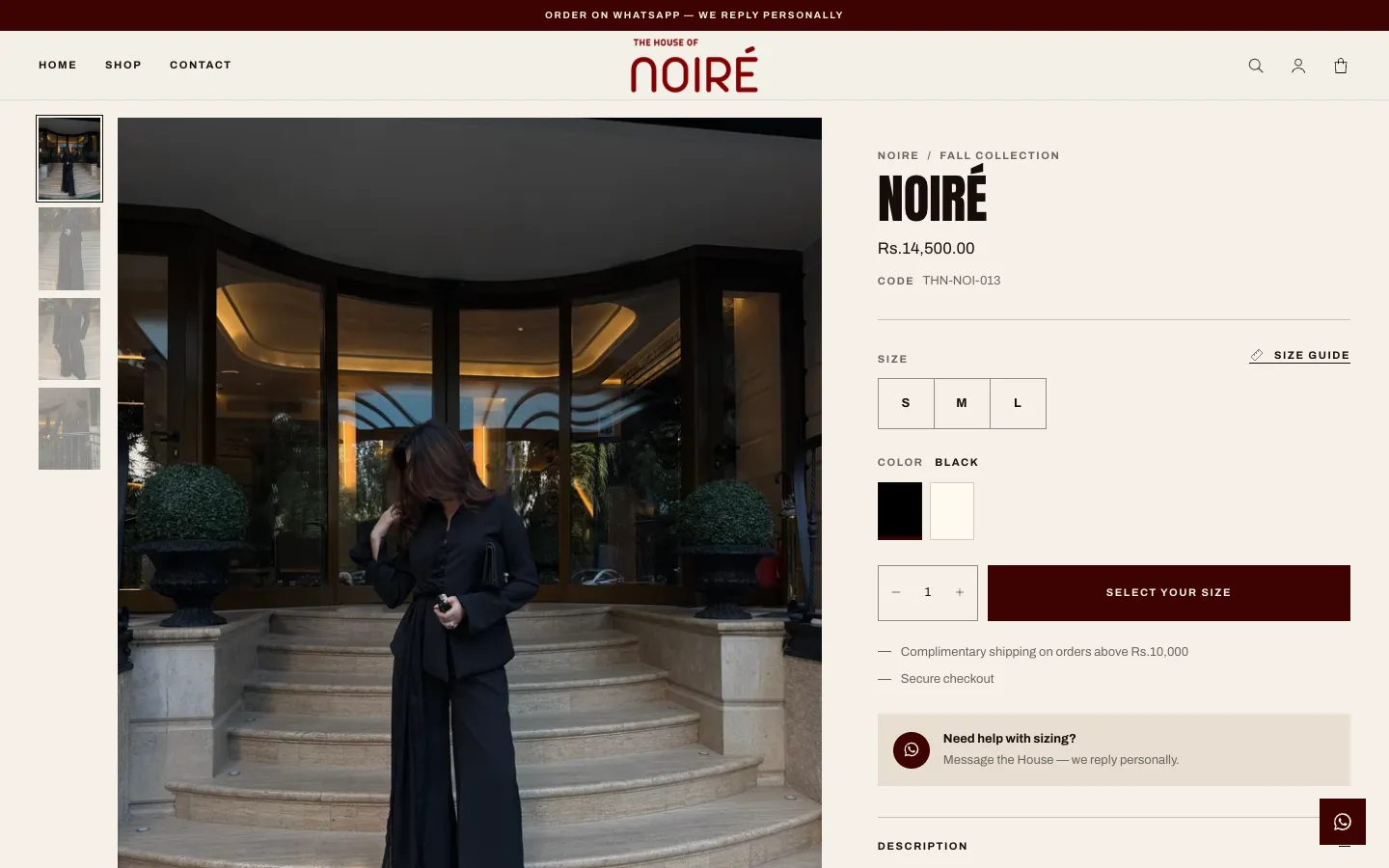
The House of Noire
Custom Shopify theme
Product page. Product pages keep the size guide, size and colour buttons, price and WhatsApp sizing help together.
Read the case studyThe approach
Shopify hosts the platform and keeps it patched, so you don't maintain servers. What still drifts is everything on top: the theme, the apps, the products and pages, and the data that connects them.
Three things cause most of the trouble I see on live stores:
Apps pile up. Each app can add scripts to every page, and an uninstalled app can leave code behind in the theme.
Content changes break links. Deleting a product or changing a handle leaves a 404 for anyone who saved or shared the old address.
Platform changes arrive on a schedule. Shopify releases new versions of its Admin API on a regular schedule, so custom apps need an occasional check. If your store runs one, see Shopify app development.
None of this is dramatic. It builds up quietly until a page loads slowly or a link fails at the wrong moment. Monthly care is a way to catch it early.
You work directly with me from requirements through launch. That keeps product context close to technical decisions and avoids the gaps that appear when strategy, interface, backend, and deployment are treated as separate problems.
What I can build
The scope is shaped around your users, operating reality, and the smallest responsible path to value.
I review the installed apps and the theme code for leftovers, duplicates and conflicts, then tell you what I found in plain language.
Before I touch anything, I duplicate your theme so there is always a copy to go back to, and I use a backup app if your store has one.
I look for dead links and set up Shopify URL redirects where an old address should point to a new page.
I measure the store with Google's Core Web Vitals and flag what costs the most load time.
1 hour of included developer time each month for text, banners, section tweaks and small layout changes, done on a copy of your theme and shown to you first.
What was checked, what changed and what I'd look at next.
Terms and larger sites
From $100 a month, in US dollars, month to month. Cancel any time.
A reply within 24 hours.
How it works:
It runs month to month. You can cancel any time.
Included developer time doesn't roll over to the next month.
Work beyond the included time is quoted first, so nothing is billed as a surprise.
Hosting, your Shopify subscription, app fees and theme licences are not included. You pay Shopify and the app makers directly.
Some stores need more than the monthly service above: a checkout check, app-conflict fixes or more developer time. These are available for stores and larger sites. The monthly price is quoted after a free look at the site.
Each month
Your store keeps selling the whole time. A change follows this order:
1. Check. I run the theme and app health check and the link and speed checks, and note what needs attention.
2. Duplicate. I copy your live theme, so the original stays untouched in your theme library.
3. Change. I make the fix or update on the unpublished copy, not on the live theme.
4. Preview. You get a preview link to look at on desktop and mobile.
5. Publish on approval. Nothing goes live until you say so. The previous theme stays in your library, so it can be restored in one click.
6. Report. At the end of the month you get a short written summary of what was checked, what changed and what I'd look at next.
Apps
Apps are one of the most common reasons a Shopify store slows down, alongside oversized images and theme code that was never cleaned up. Each app you install can load its own scripts on every page, including pages where it does nothing. When an app is uninstalled, some of its code can stay in the theme and keep loading.
In the monthly check I list what is installed, look for leftover code from apps that are gone, and point out apps that do the same job. Where it makes sense, I replace a heavy app with a section built into the theme, because a few lines of theme code usually cost less than another app. That is a judgement call each time, and I tell you the trade-off before I change anything.
I build themes this way myself. The House of Noire, a store I redesigned and built from scratch as a custom theme, loads no third-party app scripts on its pages, only Shopify's own and the Meta pixel. If you are weighing a bigger rebuild rather than ongoing care, see Shopify theme development.
To see what your store runs today, try the free Shopify theme detector.
Redirects
Shopify stores change constantly. Products sell out and get deleted, collections are renamed, handles are edited. Each change can leave an old address that now returns a 404, and those dead ends frustrate shoppers and waste search visitors.
Each month I check for broken links and add Shopify URL redirects so old addresses send people to the right new page. You can test a redirect yourself with the free redirect checker. If you are moving from WooCommerce, the guide to WooCommerce to Shopify redirects explains how the mapping works.
Limits
Monthly maintenance is for keeping a working store in good shape. These are separate work:
New themes and redesigns. A new look is a project, quoted on its own. See website redesign.
Custom apps. Building or rebuilding an app is covered under Shopify app development.
Shopify and app fees. Your Shopify subscription, app subscriptions and theme licences are paid to their owners.
Marketing. Ads, email campaigns and content writing are not part of maintenance.
Unused hours. Included developer time doesn't carry over.
Which option
Monthly maintenance fits when your store needs regular attention: you add products often, you run several apps, or you want someone checking it every month. A one-off task fits when you have a specific problem, such as a broken section or a speed fix, and nothing else. I offer both, monthly maintenance or per task, and you can start with a task and move to monthly maintenance later.
If you run an agency and need a Shopify developer behind your own brand, see white-label Shopify development. If your store is the larger project, start with Shopify development. Running WordPress instead? See WordPress maintenance.
Who does the work
I am Ali Nawaz, a freelance developer and registered Shopify Partner. That means I can request collaborator access to your store and control with you which parts of the admin I see, instead of asking for a password.
I worked from 2019 to 2024 as a senior developer for a US digital agency, including Shopify storefronts. My largest Shopify client was Zuboot, which I worked with until the business closed in 2024. It is no longer online, so it isn't linked here.
Projects include 15 days of free support after launch. Ongoing care is what comes next.
What the work should create
Pricing
How pricing works
Client feedback
Reviews from clients I have worked with remotely, quoted as they wrote them.
The process
You get a senior engineering partner—not a black box. The process stays direct, collaborative, and focused on outcomes.
Clarify the problem, users, constraints, and measure of success.
Shape the right product, technical plan, and delivery path.
Create in focused iterations with quality visible at every step.
Test, deploy, measure, and improve with confidence.
Common questions
Shopify maintenance starts from $100 a month, in US dollars, month to month. That covers the monthly theme and app health check, theme backup, broken-link and speed checks, 1 hour of included developer time and a monthly report. Stores and larger sites can need more, such as a checkout check or more developer time. The monthly price for those is quoted after a free look at the site. Work beyond the included time is quoted first. Your Shopify subscription and app fees are paid separately.
Shopify maintains the platform: hosting, security patches and checkout. It doesn't look after your theme, your apps, your content or your redirects. Those are the parts that slow a store down or break links, and they are what maintenance covers.
A monthly theme and app health check, a theme backup before any change, a broken-link and speed check, 1 hour of included developer time and a monthly report. A checkout check, app-conflict fixes and more developer time are available for stores and larger sites, with the monthly price quoted after a free look at the site.
No. As a registered Shopify Partner I request collaborator access through Shopify. You choose what I can see and can remove my access at any time.
Often, yes. I check which apps load scripts, remove code left behind by apps you've uninstalled, and where sensible replace a heavy app with a theme section. I tell you what I plan to change before I change it, and I work on a copy of the theme first.
Yes. It runs month to month. Included developer time doesn't roll over.
Start a conversation
Request your free store audit.
ali@bealinawaz.com